spring-boot中kettle使用

spring-boot中kettle的使用及出现的问题

maven项目无法自动导入kettle包

在pom.xml中加入如下节点,这个节点指向了他们自己的jar包仓库

1
2
3
4
5
6
7
8
9
10
<repositories>
<repository>
<id>pentaho-releases</id>
<url>http://repository.pentaho.org/artifactory/repo/</url>
</repository>
<repository>
<id>pentaho-nexus</id>
<url>https://nexus.pentaho.org/content/groups/omni/</url>
</repository>
</repositories>

调用kettle需要使用到的包:

  • commons-vfs-20100924-pentaho.jar
  • kettle-core-5.4.0.1-130.jar
  • kettle-dbdialog-5.4.0.1-130.jar
  • kettle-engine-5.4.0.1-130.jar
  • pentaho-big-data-plugins-5.4.0.1-130.jar(data-integration\plugins\pentaho-big-data-plugin下)
  • kettle-ui-swt-5.4.0.1-130.jar(ui包我暂时没用到)

maven打包项目找不到第三方引入包
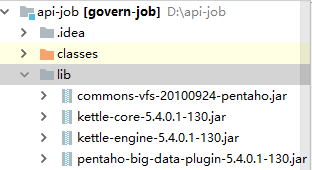
图1

然后在maven项目pom.xml中引入依赖如下:

1
2
3
4
5
6
7
8
9
10
11
12
13
14
15
16
17
18
19
20
21
22
23
24
25
26
27
28
29
30
31
<dependency>
<groupId>pentaho-kettle</groupId>
<artifactId>kettle-core</artifactId>
<version>5.4.0.1-130</version>
<scope>system</scope>
<systemPath>${project.basedir}/lib/kettle-core-5.4.0.1-130.jar</systemPath>
</dependency>

<dependency>
<groupId>pentaho-kettle</groupId>
<artifactId>kettle-engine</artifactId>
<version>5.4.0.1-130</version>
<scope>system</scope>
<systemPath>${project.basedir}/lib/kettle-engine-5.4.0.1-130.jar</systemPath>
</dependency>

<dependency>
<groupId>pentaho</groupId>
<artifactId>pentaho-big-data-plugin</artifactId>
<version>5.4.0.1-130</version>
<scope>system</scope>
<systemPath>${project.basedir}/lib/pentaho-big-data-plugin-5.4.0.1-130.jar</systemPath>
</dependency>

<dependency>
<groupId>org.apache.commons</groupId>
<artifactId>commons-vfs2</artifactId>
<version>2.1-20100924</version>
<scope>system</scope>
<systemPath>${project.basedir}/lib/commons-vfs-20100924-pentaho.jar</systemPath>
</dependency>

此外还需要在maven plugin中配置如下:

1
2
3
4
5
6
7
8
9
10
11
12
13
14
15
16
17
 <plugin>
<groupId>org.springframework.boot</groupId>
<artifactId>spring-boot-maven-plugin</artifactId>
<executions>
<execution>
<goals>
<goal>repackage</goal>
</goals>
</execution>
</executions>
<configuration>
<executable>true</executable>
<fork>true</fork>
<addResources>true</addResources>
<includeSystemScope>true</includeSystemScope>
</configuration>
</plugin>

这时打包就不会报错了。

kettle有些类找不到

kettle3.x版本到kettle4.x及之后版本有一些代码的迁移和变动
StepLoader是我们获取每步转换信息的基础,其主要改动如下:

  • StepLoader.findStepPluginWithID(id) –> PluginRegistry.findPluginWithId(StepPluginType.class, id)
  • StepPlugin –> PluginInterface
  • StepLoader.getStepClass(StepPlugin) –> (StepMetaInterface)PluginRegistry.loadClass(PluginInterface, PluginClassType.MainClassType)
  • StepLoader.getStepPluginID(StepMetaInterface) –> PluginRegistry.getPluginId(StepPluginType..class, StepMetaInterface)
  • init() –> taken over by PluginRegistry.init() and StepPluginType.searchPlugins()
  • getPluginPackages() –> is now available as getPluginPackages(PluginTypeInterface) returning a list of package names
  • getPluginInformation() –> getPluginInformation(PluginTypeInterface) returning a RowBuffer object
    JobEntryLoader同样是作业启动的基础,其主要改动如下:
  • JobEntryLoader.findJobEntriesWithDescription(String) –> PluginRegistry.findPluginWithName(StepPluginType..class, description)
  • JobPlugin (also with a wrong name!) –> PluginInterface
  • JobEntryLoader.getStepClass(StepPlugin) –> (JobEntryInterface)PluginRegistry.loadClass(PluginInterface, PluginClassType.MainClassType)
  • JobEntryLoader.getJobEntryPluginID(JobEntryInterface) –> PluginRegistry.getPluginId(JobEntryPluginType.getInstance(), JobEntryInterface)
  • init(): taken over by PluginRegistry.init() and JobEntryPluginType.searchPlugins()

使用java执行kettle

1.通过文件方式执行转换

1
2
3
4
5
6
7
8
9
10
11
12
13
14
15
16
17
18
19
20
21
public static void runTransfer(String[] params, String ktrPath) {  
Trans trans = null;
try {
// // 初始化
// 转换元对象
KettleEnvironment.init();// 初始化 EnvUtil.environmentInit();
TransMeta transMeta = new TransMeta(ktrPath);
// 转换
trans = new Trans(transMeta);

// 执行转换 trans.execute(params);
// 等待转换执行结束 trans.waitUntilFinished();
// 抛出异常
if (trans.getErrors() > 0) {
throw new Exception(
"There are errors during transformation exception!(传输过程中发生异常)");
}
} catch (Exception e) {
e.printStackTrace();
}
}

2.通过文件方式执行job

1
2
3
4
5
6
7
8
9
10
11
12
13
14
15
16
17
18
19
20
21
22
23
public static void runJob(Map<String,String> maps, String jobPath) {  
try {
KettleEnvironment.init();
// jobname 是Job脚本的路径及名称
JobMeta jobMeta = new JobMeta(jobPath, null);
Job job = new Job(null, jobMeta);
// 向Job 脚本传递参数,脚本中获取参数值:${参数名}
// job.setVariable(paraname, paravalue);
Set<Entry<String, String>> set=maps.entrySet();
for(Iterator<Entry<String, String>> it=set.iterator();it.hasNext();){
Entry<String, String> ent=it.next();
job.setVariable(ent.getKey(), ent.getValue());
}
job.start();
job.waitUntilFinished();
if (job.getErrors() > 0) {
throw new Exception(
"There are errors during job exception!(执行job发生异常)");
}
} catch (Exception e) {
e.printStackTrace();
}
}

3.执行资源库的中的转换

可以将转换文件存储到资源库,通过程序进行调用

1
2
3
4
5
6
7
8
9
10
11
12
13
14
15
16
17
18
19
20
21
22
public static void runWithDb() throws KettleException{ 
KettleEnvironment.init();
//创建DB资源库
KettleDatabaseRepository repository=new KettleDatabaseRepository();
DatabaseMeta databaseMeta=new DatabaseMeta("kettle","mysql","jdbc","localhost","kettle","3306","root","root");
//选择资源库
KettleDatabaseRepositoryMeta kettleDatabaseRepositoryMeta=new KettleDatabaseRepositoryMeta("kettle","kettle","Transformation description",databaseMeta);
repository.init(kettleDatabaseRepositoryMeta);
//连接资源库
repository.connect("admin","admin");
RepositoryDirectoryInterface directoryInterface=repository.loadRepositoryDirectoryTree();
//选择转换
TransMeta transMeta=repository.loadTransformation("demo1",directoryInterface,null,true,null);
Trans trans=new Trans(transMeta);
trans.execute(null);
trans.waitUntilFinished();//等待直到数据结束
if(trans.getErrors()>0){
System.out.println("transformation error");
}else{
System.out.println("transformation successfully");
}
}

kettle二次开发实现转换的web接口

1
2
3
4
5
6
7
8
9
10
11
12
13
14
15
16
17
18
19
20
21
//运行作业
@RequestMapping(value = "/run",method = RequestMethod.POST)
public AjaxObject runJob(@RequestBody TranModel tranModel, HttpServletRequest request){
try{
TransMeta transMeta = TransBuilder.buildCopyTable(tranModel.getTransformationName(),tranModel.getSourceDatabaseName(),
tranModel.getSourceTableName(),tranModel.getSourceFields(),tranModel.getTargetDatabaseName(),
tranModel.getTargetTableName(),tranModel.getTargetFields());
KettleEnvironment.init();
Trans trans = new Trans(transMeta);
trans.execute(null);
trans.waitUntilFinished();
if(trans.getErrors()!=0){
return AjaxObject.ok("转换出错");
}else {
return AjaxObject.ok("转换成功");
}
} catch (Exception e){
e.printStackTrace();
return AjaxObject.ok("转换出错");
}
}

其中TransBuilder是自己写的生成转换的类,主要实现了表输入->插入更新功能。

1
2
3
4
5
6
7
8
9
10
11
12
13
14
15
16
17
18
19
20
21
22
23
24
25
26
27
28
29
30
31
32
33
34
35
36
37
38
39
40
41
42
43
44
45
46
47
48
49
50
51
52
53
54
55
56
57
58
59
60
61
62
63
64
65
66
67
68
69
70
71
72
73
74
75
76
77
78
79
80
81
82
83
84
85
86
87
88
89
90
91
92
93
94
95
96
97
98
99
100
101
102
103
104
105
106
107
108
109
110
public class TransBuilder {
public static final TransMeta buildCopyTable(String transformationName, String sourceDatabaseName, String sourceTableName,
String[] sourceFields, String targetDatabaseName, String targetTableName, String[] targetFields)
throws KettleException {
KettleEnvironment.init();
EnvUtil.environmentInit();
String[] databasesXML = {
"<?xml version=\"1.0\" encoding=\"UTF-8\"?>" +
"<connection>" +
"<name>target</name>" +
"<server>localhost</server>" +
"<type>Mysql</type>" +
"<access>Native</access>" +
"<database>" + targetDatabaseName + "</database>" +
"<port>3306</port>" +
"<username>root</username>" +
"<password>Root@123</password>" +
"</connection>",
"<?xml version=\"1.0\" encoding=\"UTF-8\"?>" +
"<connection>" +
"<name>source</name>" +
"<server>10.4.20.151</server>" +
"<type>Mysql</type>" +
"<access>Native</access>" +
"<database>" + sourceDatabaseName + "</database>" +
"<port>3306</port>" +
"<username>root</username>" +
"<password>Root@123</password>" +
"</connection>"
};
try {
//创建一个transMeta 对象
TransMeta transMeta = new TransMeta();
transMeta.setName(transformationName);
// 创建数据库对象,将数据库对象作为属性添加到transMeta 对象中
for (int i = 0; i < databasesXML.length; i++) {
DatabaseMeta databaseMeta = new DatabaseMeta(databasesXML[i]);
transMeta.addDatabase(databaseMeta);
}
//registry是给每个步骤生成一个标识Id用
PluginRegistry registry = PluginRegistry.getInstance();
//第一个表输入步骤(TableInputMeta)
TableInputMeta tableInput = new TableInputMeta();
String tableInputPluginId = registry.getPluginId(StepPluginType.class, tableInput);
//给表输入添加一个DatabaseMeta连接数据库
DatabaseMeta sourceDatabase = transMeta.findDatabase("source");
tableInput.setDatabaseMeta(sourceDatabase);
String select_sql = "SELECT ";
for (int i = 0; i < sourceFields.length; i++) {
if (i > 0) {
select_sql += ", ";
} else {
select_sql += " ";
}
select_sql += sourceFields[i] + " ";
}
select_sql += "FROM " + sourceTableName;
System.out.println(select_sql);
tableInput.setSQL(select_sql);
//添加TableInputMeta到转换中
StepMeta tableInputMetaStep = new StepMeta(tableInputPluginId,"table_input",tableInput);
//给步骤添加在spoon工具中的显示位置
tableInputMetaStep.setDraw(true);
tableInputMetaStep.setLocation(100, 100);
transMeta.addStep(tableInputMetaStep);
//第二个步骤插入与更新
InsertUpdateMeta insertUpdateMeta = new InsertUpdateMeta();
String insertUpdateMetaPluginId = registry.getPluginId(StepPluginType.class,insertUpdateMeta);
//添加数据库连接
DatabaseMeta targetDatabase = transMeta.findDatabase("target");
insertUpdateMeta.setDatabaseMeta(targetDatabase);
//设置操作的表
insertUpdateMeta.setTableName(targetTableName);
int len = targetFields.length;
//设置用来查询的关键字
insertUpdateMeta.setKeyLookup(targetFields);
insertUpdateMeta.setKeyStream(targetFields);
String[] keyStream2 = new String[len];
Arrays.fill(keyStream2, "");
String[] keyCondition = new String[len];
Arrays.fill(keyCondition, "=");
insertUpdateMeta.setKeyStream2(keyStream2);//一定要加上
insertUpdateMeta.setKeyCondition(keyCondition);
//设置要更新的字段
String[] updatelookup = targetFields;
String [] updateStream = targetFields;
Boolean[] updateOrNot = new Boolean[len];
Arrays.fill(updateOrNot, true);
insertUpdateMeta.setUpdateLookup(updatelookup);
insertUpdateMeta.setUpdateStream(updateStream);
insertUpdateMeta.setUpdate(updateOrNot);
String[] lookup = insertUpdateMeta.getUpdateLookup();
//添加步骤到转换中
StepMeta insertUpdateStep = new StepMeta(insertUpdateMetaPluginId,"insert_update",insertUpdateMeta);
insertUpdateStep.setDraw(true);
insertUpdateStep.setLocation(250,100);
transMeta.addStep(insertUpdateStep);
//******************************************************************

//******************************************************************

//添加hop把两个步骤关联起来
transMeta.addTransHop(new TransHopMeta(tableInputMetaStep, insertUpdateStep));
System.out.println("***********the end************");
return transMeta;
}catch(Exception e){
throw new KettleException("An unexpected error occurred creating the new transformation", e);
}
};
}

最后附上kettle官方文档